For institutes
Keep every class organised around its exam level
One batch per board and level, with its students, teachers, work and progress in one place.
Step 1 of 6
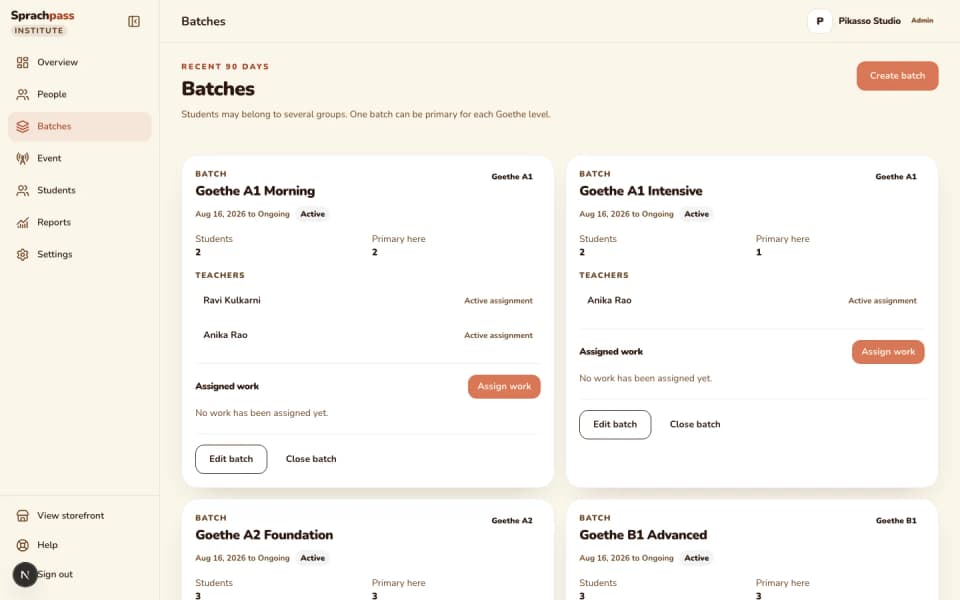
Create the batch.
Open Batches, choose Create batch, give it a name, and pick the board (Goethe or telc) and the level (A1 to B2). The batch card then shows its exam target, its dates and its state.
Step 2 of 6
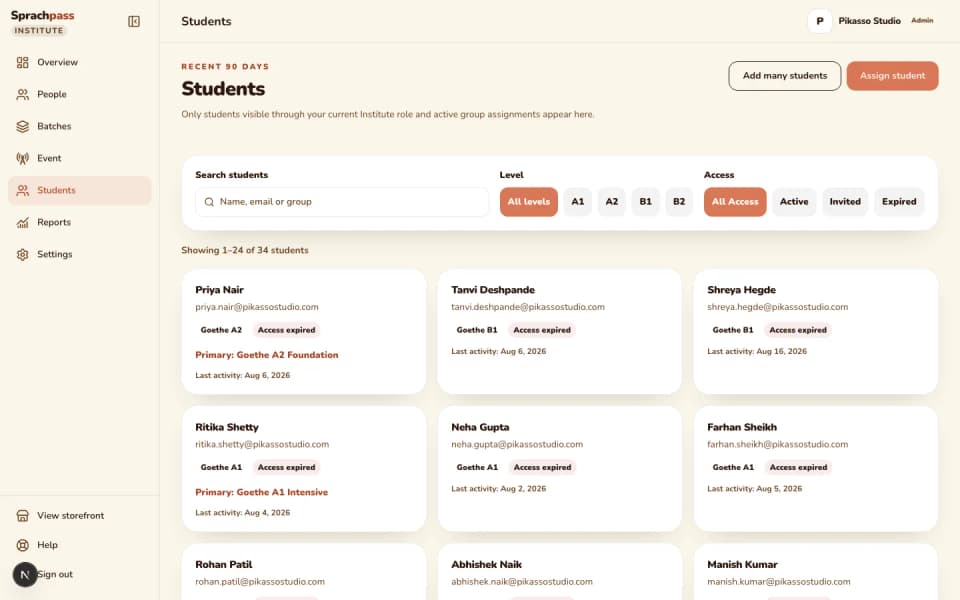
Add students and set their primary batch.
Assign a licence to a student, set the board and level they are preparing for, and place them in the batch. A student can belong to several groups; one batch is primary for each board and level, and that is the batch their work counts toward.
Step 3 of 6
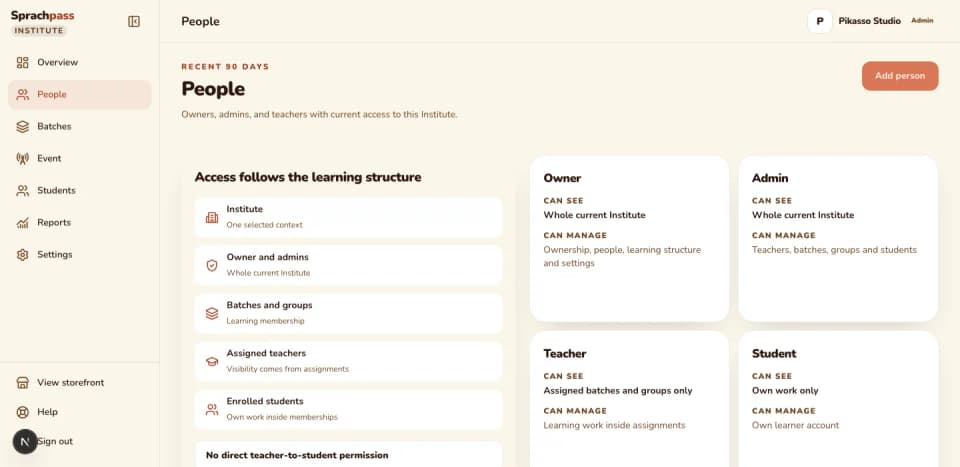
Assign the teachers.
Add a teacher under People, then assign them to the batch. Access follows the assignment: a teacher sees the batches and groups they are assigned to and nothing else.
End the assignment when the intake finishes.
Step 4 of 6
Hand out work to the whole batch.
From the batch card, assign a Hören or Lesen practice run or a mock exam to the batch or to a single student, with an optional due date. Each recipient shows to do, completed or cancelled.
Step 5 of 6
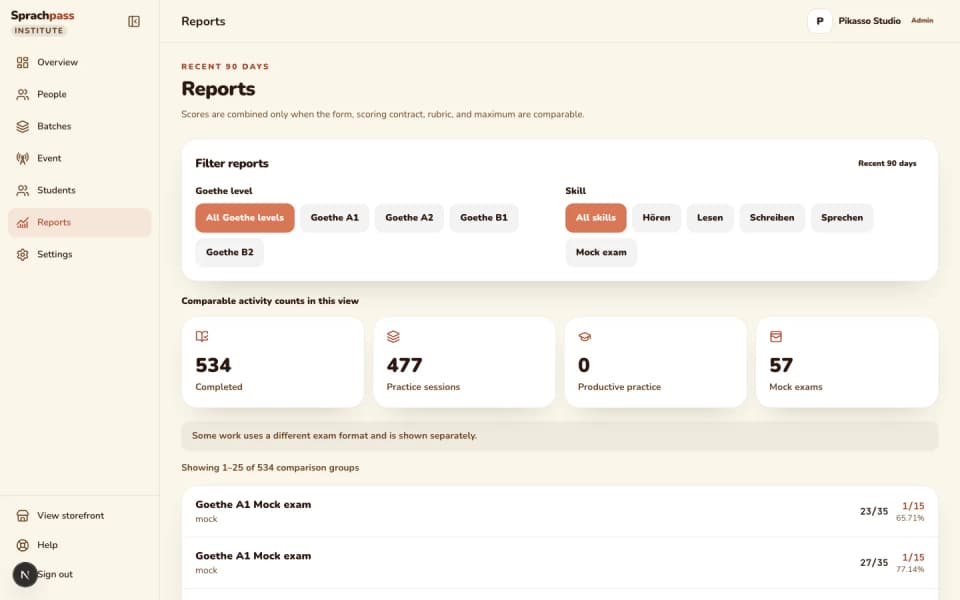
Read the batch report.
Filter Reports by level and skill. Practice sessions, writing and speaking tasks, and mock exams stay separate, and scores are only added together when they measure the same paper.
Open a student to see every run and every question they got right or wrong.
Step 6 of 6
Close the batch.
When the intake is finished, close the batch. Its students, assignments and history stay readable in the institute view.
How it runs, step by step
Step 1 of 6: Create the batch.
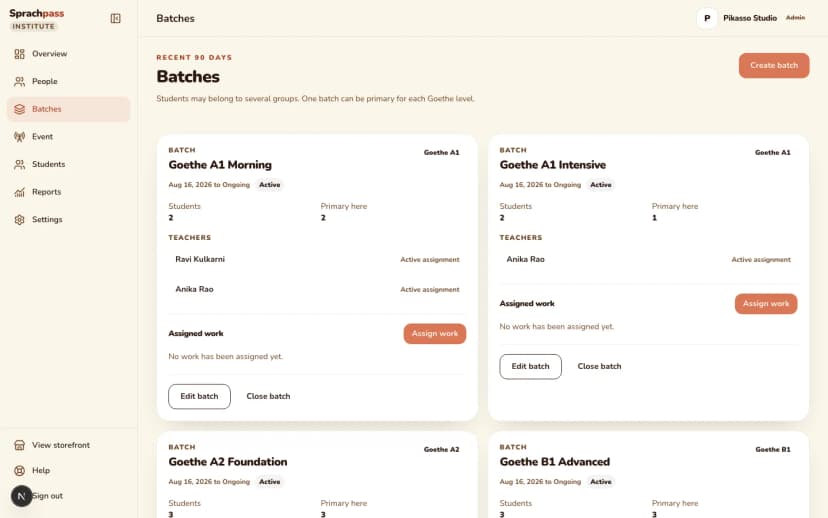
An institute that prepares learners for Goethe exams runs on batches. A batch is one group, one board, one level, one set of dates and its assigned teachers.
The problem and the outcome

The problem an owner has.
Students are spread across levels and boards, teachers change between intakes, and the only record of who practised is whatever each teacher remembers. By the time a weak student is noticed, the exam is two weeks away.

What changes with batches.
Every student sits in a batch with a fixed exam target. Teachers see exactly the batches they are assigned to.
Practice runs and mock exams are counted per batch, per level and per skill, so a student who has stopped practising shows up in the batch report as soon as the report is opened, not at the end of the intake.
The questions that get slow in a spreadsheet
| The question | In a spreadsheet | With batches |
|---|---|---|
| Who is in the B1 evening group? | Students are spread across levels and boards | Every student sits in a batch with a fixed exam target |
| Which teacher covers it? | Teachers change between intakes | Teachers see exactly the batches they are assigned to |
| Who has actually practised this week? | The only record of who practised is whatever each teacher remembers | Practice runs and mock exams are counted per batch, per level and per skill |
| Who is going to fail the Hören module unless someone intervenes? | By the time a weak student is noticed, the exam is two weeks away | A student who has stopped practising shows up in the batch report as soon as the report is opened, not at the end of the intake |
Who can do what
What each role can do
| capability | Owner | Admin | Teacher | Student |
|---|---|---|---|---|
| See the whole institute | yes | yes | assigned batches only | own work only |
| Create, rename and close batches | yes | yes | no | no |
| Add people and assign teachers | yes | yes | no | no |
| Add students, assign and renew licences, change a student's level | yes | yes | no | no |
| Assign practice and mock work | yes | yes | yes, inside assigned batches | no |
| Read student progress and reports | all students | all students | assigned students only | own |
| Change institute settings and branding | yes | yes | no | no |
| See purchases and licence inventory | yes | no | no | no |
| Transfer ownership | yes | no | no | no |


Licences and limits
Licences, batches, seat allowances
Refunds: only on licences that were never assigned, within 30 days of purchase. Onboarding is approval-gated: a new institute waits for approval before its workspace goes live.
Limits and licences
| Rule | What it means |
|---|---|
| One licence covers | One student, bought one at a time or in bulk, never as a subscription |
| Pricing | Shared when you register or book a demo; the shared pricing page is linked from the header and footer |
| Assignment | To one student by email; the licence runs for one month from the day you assign it, and the exact end date is shown at assignment |
| Renewal | Assign another licence to the same student and the end date extends from where it was, so nothing is lost by renewing early |
| Unassigned licences | Keep for a year |
| What a seat includes | The whole Sprachpass practice product for the student's board and level: unlimited listening and reading practice, 25 scored writing and speaking tasks a day, 4 full mock exams per ISO week, and the workspace's own branded entrance instead of the retail site |
| Devices | Two devices at a time and one session at a time, which is what keeps a licence with the student it was bought for |
| Caps on batches, groups, teachers or admins | None; the limit that matters is licences, and the roster shows at a glance how many are active, invited or ended |
Coming next
What is on the way, honestly
Writing and speaking assignments.
Today you can assign Hören and Lesen practice runs and mock exams to a batch. Assigning Schreiben and Sprechen tasks to a group is on the roadmap; students can still do them on their own inside the seat.
Teacher effectiveness.
The workspace shows student progress per batch. It does not yet publish an effectiveness score per teacher.
Your own domain.
A branded Sprachpass subdomain is live today; connecting the portal to the institute's own domain is a roadmap item.
Bulk CSV export.
Reports are read on screen and per student; export is not part of the current release.
Other modules
The rest of the institute cockpit
Questions
What owners ask before registering
Can a student be in more than one batch?
Yes. A student can belong to several groups.
One batch is primary for each board and level, and that primary batch is where their practice and mock work is counted.
What happens to a student's work when I close a batch?
Nothing is deleted. The batch is marked closed, its assignments stop, and its history stays readable from the student's sheet and the reports.
Can a teacher see the whole institute?
No. Teachers see the batches and groups they are assigned to, and the students inside them.
Owners and admins see the whole institute.
Can I change a student's level after the first week?
Yes, from the student's sheet. The student confirms their level once and then it is locked on their side; only the institute changes it, and the change is recorded.
Does the licence renew automatically?
No. A licence is a one-time purchase for one month of access.
You assign another licence to renew, and the end date extends from the current one.
Do students see Sprachpass prices or upgrade prompts?
No. Students enter through the institute's branded portal and never see retail pricing, upgrade prompts or retail lifecycle emails.
When a licence ends, the portal tells them to contact their institute.
How do I get started?
Register your institute. Onboarding is approval-gated, so a new workspace goes live after approval; then you buy licences, create your first batch and invite students.
Continue
Sources: Sprachpass decision log, the institute licence spec and the workspace code.
All sources
- DECISIONS.md, 2026-08-04 (business landings carry no pricing) and 2026-08-29 (page bodies still show no prices; the shared header and footer may link to Pricing) (DECISIONS.md)
- DECISIONS.md, 2026-07-15: partner program model (one-month licence from assignment, stacking renewals, one-year shelf life, refunds on unassigned licences within 30 days, approval-gated onboarding) (DECISIONS.md)
- DECISIONS.md, 2026-07-22: level lock and one session per seat (DECISIONS.md)
- Institute licence and partner student-analytics cockpit spec (25 scored tasks a day, 4 mocks per ISO week) (docs/superpowers/specs/2026-08-03-institute-license-and-analytics.md)
- Seat usage caps (25 scored tasks per day, 4 mocks per ISO week) (src/lib/partners/usage.ts)
- Institute role capabilities (src/lib/partners/capabilities.ts)
- Two live devices per seat (supabase/migrations/20260828100000_harden_partner_device_registration_lifecycle.sql)
- Assignable work kinds (practice for Hören and Lesen, mock) (src/lib/partners/learning-assignments.ts)
Ready for your first batch
Run your next intake on batches.
Register your institute, buy the licences you need, and have your first batch set up the day your workspace is approved.