
For institutes
See progress without mixing unlike exam results
Filter the last 90 days of work by level and skill. Scores are added together only when they measure the same paper.
Step 1 of 6
Choose the level or skill you want to review.
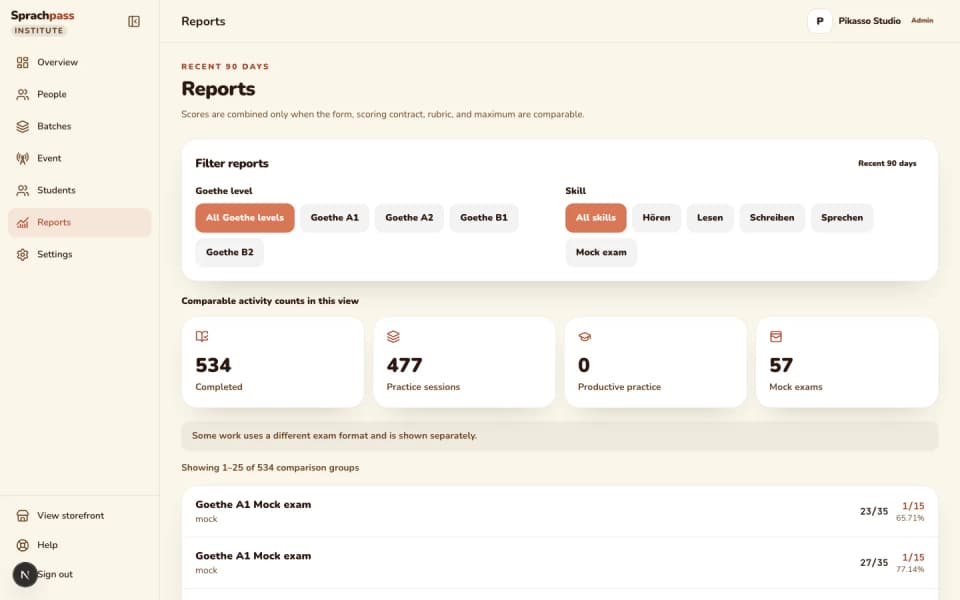
Open Reports and filter by level and by skill, or choose mock exams. Practice sessions, writing and speaking tasks and mock exams stay on separate rows, so a filter never hides which kind of work you are reading.
Step 2 of 6
Read the contributing count before the score.
Every row shows the raw score against its maximum, the percentage, how many activities contributed and how many eligible activities the batch produced in that window. A high percentage on two runs is a start, not a verdict.
Step 3 of 6
Compare like with like.
Scores are added only when the board, level, skill, part, task, form and scoring rules match, which is what makes two rows comparable. Different papers get different rows, and the change column compares each row with the same group in the previous 90 days.
Step 4 of 6
Open the students behind a weak row.
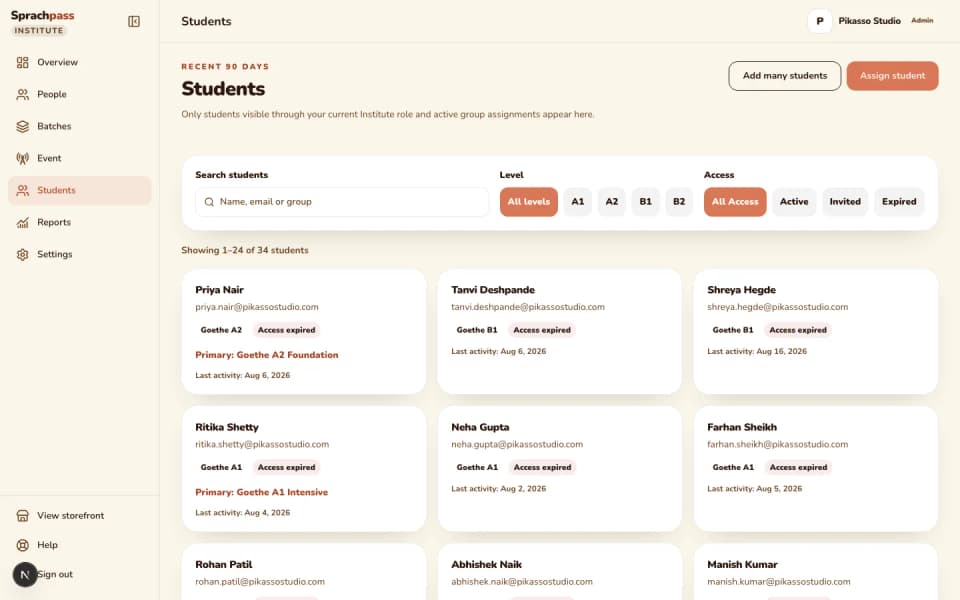
Move from the report to the students and groups producing the number. The student sheet lists each run, graded task and mock from the last 90 days with its score.
Step 5 of 6
Use the underlying answers in class.
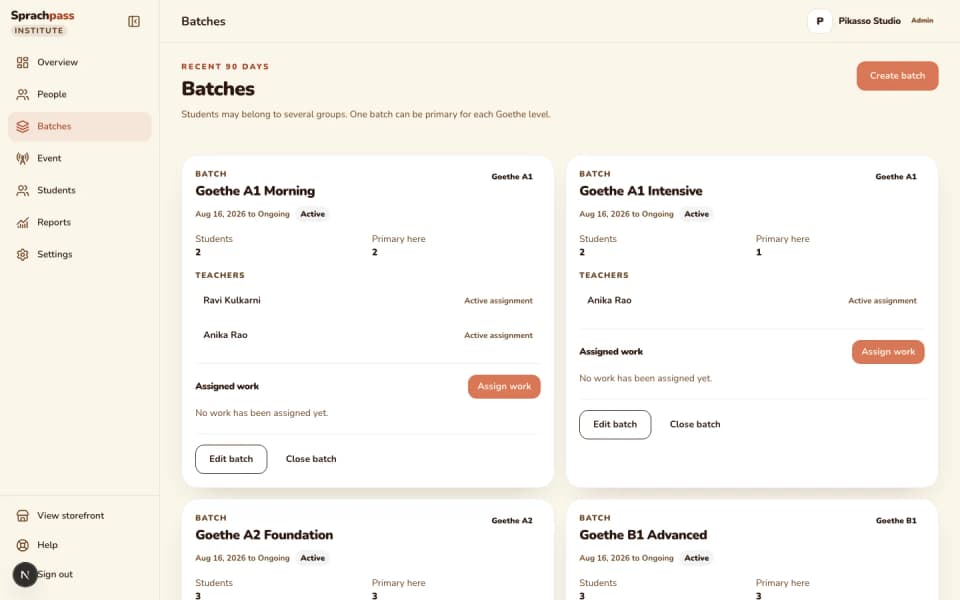
Open any practice run to see every question the student saw and the answer they picked. That per-question view is what the next lesson is built from, not an average.
Step 6 of 6
Check again next week.
The window rolls, so the same filter next week shows the same comparison groups with fresh contributing counts and a fresh change column.
How it runs, step by step
Step 1 of 6: Choose the level or skill you want to review.
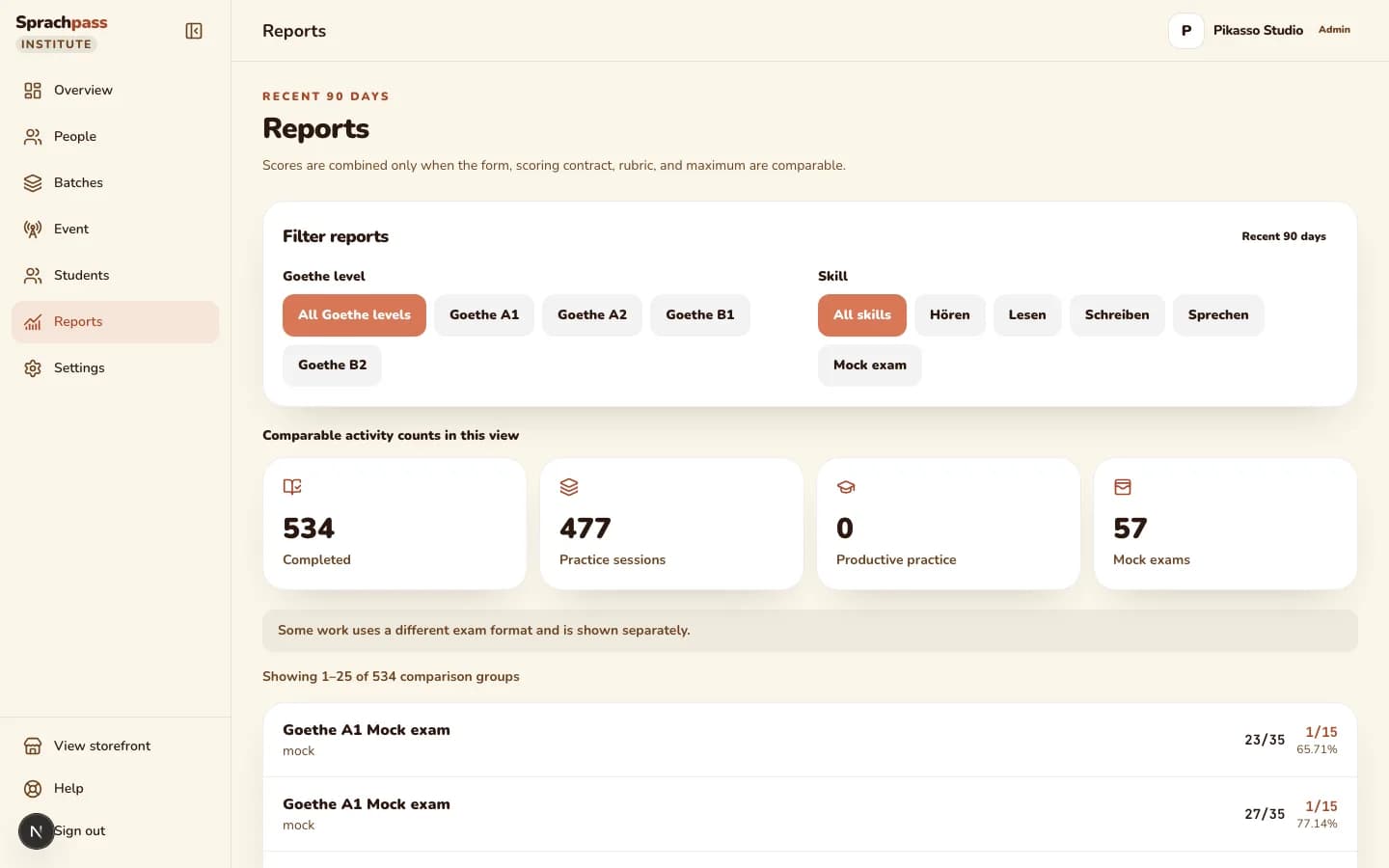
Reports show measured work: practice runs, graded writing and speaking tasks, and mock exams, each on its own row. A number is never blended across different papers, and a missing grade shows as pending, never as a zero.
The problem and the outcome

The problem an owner has.
Progress lives in each teacher's head, or in a class average that mixes a ten-question practice run with a full mock and calls the result readiness. By the time a weak student is visible, the exam is two weeks away and the number that hid them was flattering.

What changes with batch progress.
Every completed run, graded task and mock becomes a scored record with its board, level, skill, part and maximum. The report adds scores only inside one comparison group, shows how many activities contributed, and opens to the student and the exact question behind any weak row.
The questions that get slow in a spreadsheet
| The question | In a spreadsheet | With batch progress |
|---|---|---|
| How is the A2 batch doing in Hören? | Someone averages whatever scores were typed in, from whichever paper | One row per comparison group: the same board, level, skill, part and maximum, with the contributing count beside the percentage |
| Is this better than last month? | Nobody kept last month | Each row shows the change in percentage points against the previous 90 days for the same comparison group |
| Who is going to fail Schreiben unless someone intervenes? | Writing is marked on paper and the marks are in a drawer | Graded writing and speaking tasks appear as their own rows; a grade still in progress shows as pending, never as a score |
| Which question did the whole batch get wrong? | The teacher remembers, or does not | Open the student, open the run, and see every question and the answer picked |
Who can do what
Who can read what
| capability | Owner | Admin | Teacher | Student |
|---|---|---|---|---|
| Open the Reports view | yes | yes | assigned batches only | no |
| Filter by level, skill and mock exams | yes | yes | within assigned batches | no |
| Open a student's sheet and 90-day history | all students | all students | assigned students only | own work only |
| Open a run's per-question review | all students | all students | assigned students only | own runs |
| See a student's grading and mock meters | yes | yes | assigned students only | own seat |
| Assign follow-up practice or a mock from the report | yes | yes | inside assigned batches | no |
| Export a report | not in this release | not in this release | no | no |
Licences and limits
Windows, groups, seat allowances
There is no invented readiness score. When evidence is missing or a grade is still pending, the report says so instead of filling the gap.
Limits and rules
| Rule | What it means |
|---|---|
| What counts | A completed practice run, a graded writing or speaking task, or a completed mock; work in progress does not enter the report |
| What is added together | Only records with the same board, level, skill, part, task, form, scoring rules and maximum; anything else is its own row |
| Window | The last 90 days, with each row compared to the same group in the 90 days before; the student sheet shows the same 90 days of history |
| Pending grades | A writing or speaking task that is still being graded shows as pending on its row and is not counted as a score |
| Empty state | A batch with no comparable completed work shows the plain line No comparable completed work yet, never a zero |
| Mock results | Each mock is one row per comparison group; a mock that scored only some skills is marked as partial rather than totalled as if it were complete |
| Boards and levels | Goethe and telc rows at A1, A2 and B1; a B2 seat's work stays on the student sheet and does not enter the batch report yet |
| Who is included | Students with active or ended access in the institute; a student's retail account outside the institute is never read |
Coming next
What is on the way, honestly
Teacher effectiveness.
The report is per batch, level and skill. A per-teacher comparison of how students practise and score is on the institute roadmap.

Batch rankings.
Batch-wise averages and rankings across the institute are planned. Today you compare rows inside the filters you set.
B2 rows in the batch report.
The report covers A1, A2 and B1 on both boards today. A B2 seat's runs and mocks stay readable on the student sheet until B2 batches and B2 report rows arrive together.
CSV export.
Reports are read on screen, student by student. Exporting a report or a student's history to a file is not part of the current release.
Learning-month tracking.
The roadmap adds a learning journey on your own course content, tracked in the same place as exam practice. Today the report covers exam practice, graded tasks and mocks.
Other modules
The rest of the institute cockpit
Questions
What owners ask before registering
Why does the report never show one overall score?
Because a ten-question Lesen run, a graded Schreiben task and a full mock measure different things with different maximums. One blended number would hide exactly the student the report exists to find.
What does contributing mean on a row?
How many completed activities were added into that row's score. Eligible is how many activities of that kind the batch produced in the window, so you can see how much of the batch the number represents.
How long does history stay?
The report reads the last 90 days and compares them with the 90 days before. The student's own runs stay on their sheet, and ending a student's access does not delete them.
Why is a Schreiben row marked pending?
One task is still being graded. The row keeps it visible as pending instead of scoring it as zero, and it fills in once the grade lands.
Can a teacher see progress for the whole institute?
No, a teacher sees progress for assigned batches only. Owners and admins see every batch.
Is there a readiness score?
No, the cockpit reports measured work only. Deciding whether a student is ready is the teacher's call, made from the per-question view and the mock rows.
Continue
Sources: Sprachpass progress report contract, the observation ledger, the institute licence and cockpit spec and the decision log.
All sources
- DECISIONS.md, 2026-08-04 (business landings carry no pricing) and 2026-08-29 (page bodies still show no prices; the shared header and footer may link to Pricing) (DECISIONS.md)
- Institute licence and partner student-analytics cockpit spec (25 scored tasks a day, 4 mocks per ISO week) (docs/superpowers/specs/2026-08-03-institute-license-and-analytics.md)
- Seat usage caps (25 scored tasks per day, 4 mocks per ISO week) (src/lib/partners/usage.ts)
- Institute role capabilities (src/lib/partners/capabilities.ts)
- Two live devices per seat (supabase/migrations/20260828100000_harden_partner_device_registration_lifecycle.sql)
- Assignable work kinds (practice for Hören and Lesen, mock) (src/lib/partners/learning-assignments.ts)
- Institute progress report: 90-day window, per-comparison-group totals, pending grading items, empty-state reason (src/lib/partners/progress/contracts.ts)
- Progress observation ledger: the comparison group key (board, level, skill, part, task, form, scoring contract, rubric, maximum) (supabase/migrations/20260816095000_partner_progress_observations.sql)
- Institute progress on the telc board: report rows for Goethe and telc, levels A1, A2 and B1 only (supabase/migrations/20260821210000_institute_telc_board.sql)
- Epic #421: B2B institute OS roadmap (custom domains, teacher effectiveness, assignments, teacher-directed practice, learning journey, per-institute layout)
Ready for your first batch
Stop guessing who is ready.
Register your institute, license your students, and read the first batch report the week they start practising.