
For institutes
Give each teacher the view their classes need
Add teachers to the institute, assign them to batches, and keep the wider institute controls with owners and admins.
Step 1 of 5
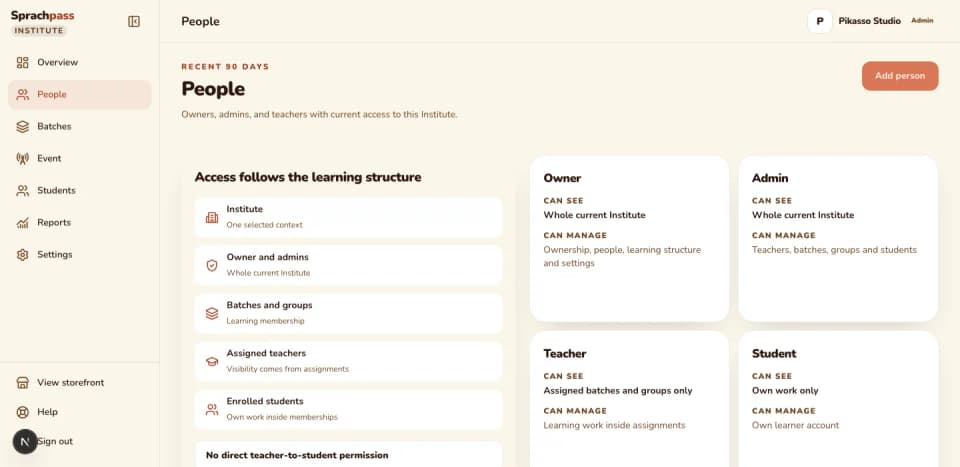
Add the teacher under People.
Enter a name and email and choose the teacher role. A new account receives a branded invite to set a password; an existing Sprachpass account receives a short notice that it was added to your institute.
Step 2 of 5
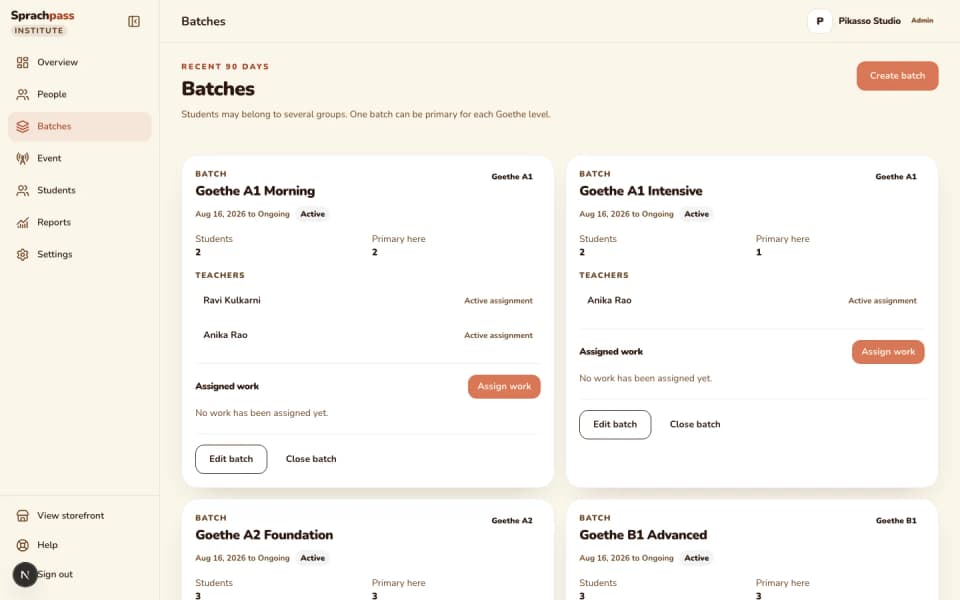
Assign the teacher to their batches.
Open the batch and add the teacher. Access follows the assignment, so a teacher with two batches sees two groups of students and nothing else.
Step 3 of 5
The teacher signs in and works inside the assignment.
From their own view a teacher opens their batches, reads each student's practice runs and mock results, and assigns a Hören or Lesen practice run or a mock exam to the whole batch or one student, with an optional due date.
Step 4 of 5
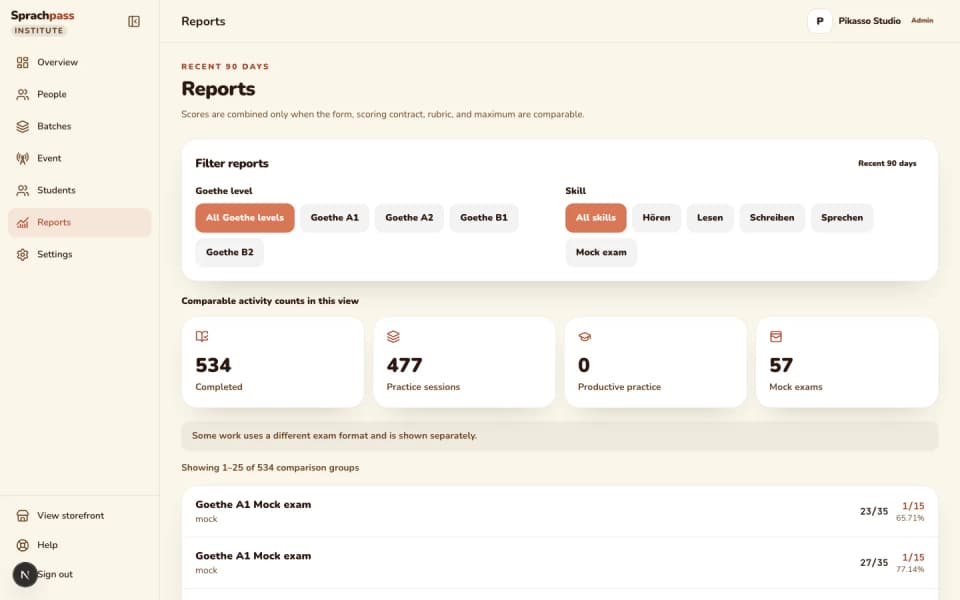
Follow the work the teacher handed out.
Each assignment shows to do, completed or cancelled per recipient, and completion is matched automatically when the student finishes work for that board, level and skill. A teacher can cancel an assignment they created.
Step 5 of 5
End the assignment when the batch finishes.
Remove the teacher from the batch or close the batch. The teacher's view of those students ends, while the batch history stays readable to owners and admins.
How it runs, step by step
Step 1 of 5: Add the teacher under People.
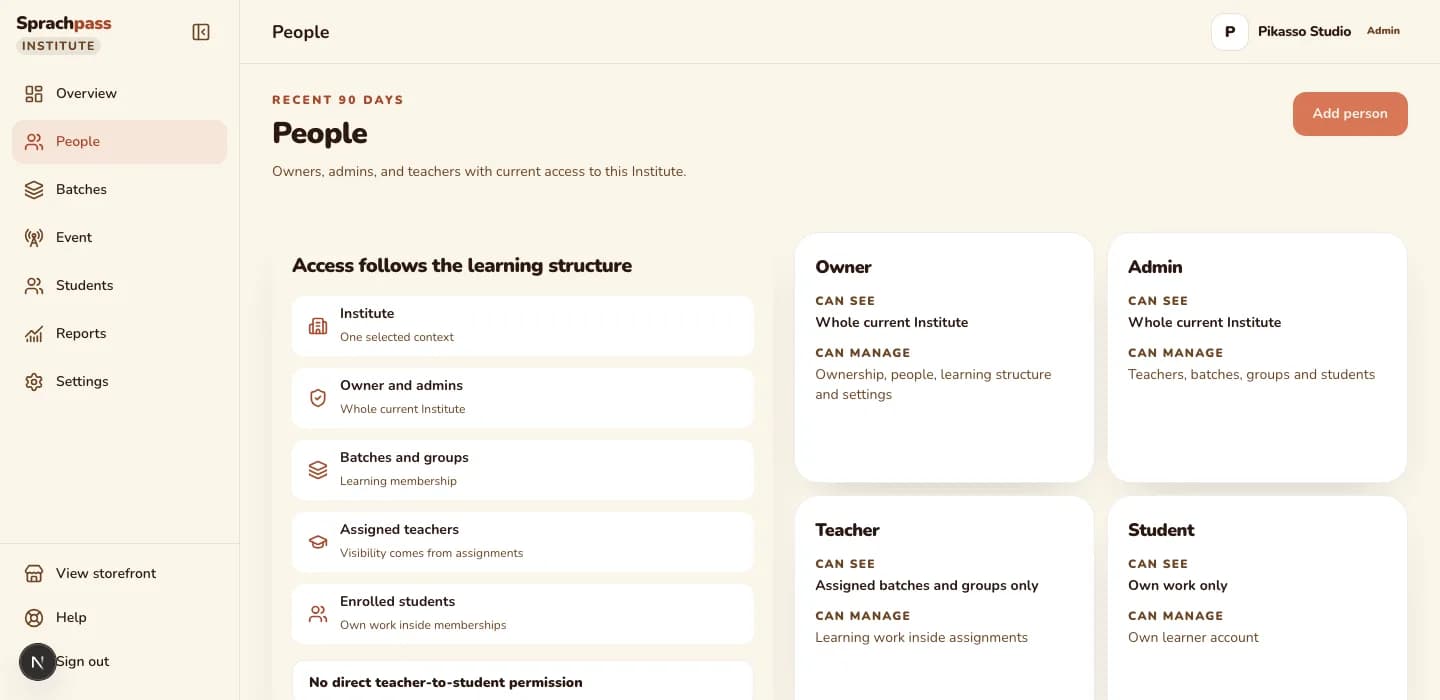
A teacher's access follows the batches they are assigned to, nothing more. Owners and admins keep the people list, the licences and the settings.
The problem and the outcome
The problem an owner has.
Teachers share one login, or the owner forwards screenshots of results after every class. A teacher who leaves keeps the password, and a new teacher gets more of the institute than the class they were hired for.

What changes with batch-scoped access.
Each teacher signs in with their own account and sees exactly the batches assigned to them. They read their students' runs, hand out Hören and Lesen practice or a mock to the batch, and lose the view the day the assignment ends.
The questions that get slow in a spreadsheet
| The question | In a spreadsheet | With teacher access |
|---|---|---|
| Which teacher covers the B1 evening group? | A name written in a cell and changed by hand each intake | The batch card lists its assigned teachers, and the teacher's own view lists their batches |
| Can this teacher see other classes' students? | Whoever holds the shared login sees everything | A teacher sees assigned batches only; owners and admins see the whole institute |
| What did my teacher assign this week? | Ask in the staff chat | Every assignment shows who created it, the target, the due date and each recipient's status |
| A teacher left last month. Who still has access? | Change the shared password and hope | End the batch assignment and the view closes; the staff row stays for the record |
Who can do what
What each role can do
| capability | Owner | Admin | Teacher | Student |
|---|---|---|---|---|
| See the whole institute | yes | yes | assigned batches only | own work only |
| Add teachers and admins under People | yes | yes | no | no |
| Assign a teacher to a batch or end the assignment | yes | yes | no | no |
| Create, rename and close batches | yes | yes | no | no |
| Add students and assign licences | yes | yes | no | no |
| Assign practice runs and mock exams | yes | yes | yes, inside assigned batches | no |
| Cancel an assignment | yes | yes | own assignments | no |
| Read progress and reports | all students | all students | assigned students only | own |
| Change institute settings and branding | yes | no, owner only | no | no |
| See purchases and licence inventory | yes | no | no | no |
| Transfer ownership | yes | no | no | no |


Licences and limits
Teachers, batches, seat allowances
Onboarding is approval-gated, so the people list opens after a person has reviewed the application.
Limits and licences
| Rule | What it means |
|---|---|
| Who needs a licence | Students only; teacher and admin accounts do not use licences and there is no cap on them |
| Teacher sign-in | Each teacher has their own email and password; an existing Sprachpass account is added, not re-invited |
| What a teacher sees | The batches assigned to them, the students in those batches, their runs and mock results, and the assignments handed out there |
| What a teacher cannot do | Add or license students, create or close batches, change settings, see purchases, or see students outside their batches |
| Ending a teacher's access | End the batch assignment; the staff row stays on the people list so the record of who taught what is kept |
| Student seats | 25 scored writing and speaking tasks a day, 4 mock exams per ISO week, 2 live devices, one active session, level locked after the student confirms it |
| Caps on batches, groups, teachers or admins | None; the limit that matters is student licences |
Coming next
What is on the way, honestly
Teacher effectiveness.
The workspace shows student progress per batch. An owner view that compares teachers by how their students practise and score is on the institute roadmap, not in the current release.
Writing and speaking assignments.
Teachers assign Hören and Lesen practice runs and mock exams today. Assigning Schreiben and Sprechen tasks to a batch is on the roadmap; students can still do them on their own inside the seat.

Homework uploads and submissions.
Uploading your own homework or assessments, collecting submissions and tracking completion against a due date are planned as an assignments module. Today's assignments are exam practice from the Sprachpass bank.
Teacher-directed practice.
A teacher telling a student to practise one grammar point with Bruno by tomorrow, and seeing that it happened, is a roadmap item.
Other modules
The rest of the institute cockpit
Questions
What owners ask before registering
Can a teacher see the whole institute?
No, teachers see the batches and groups they are assigned to, and the students inside them. Owners and admins see the whole institute.
What is the difference between an admin and a teacher?
An admin runs the institute with the owner: people, batches, students, licences and assignments across every group, while a teacher works inside assigned batches only. Purchases and ownership transfer stay with the owner.
Does a teacher need a licence?
No, licences are for students. Teacher and admin accounts do not use licences, and there is no cap on how many you add.
A teacher already uses Sprachpass. What happens when I add them?
They are not invited again. They receive a short email saying they were added to your institute, and their existing sign-in opens the institute view on the next visit.
Can two teachers share one batch?
Yes, assign both to the batch and each sees the same students. Every assignment they hand out records who created it.
How do I remove a teacher?
End their batch assignments, or close the batch. Their view of those students closes, and the record of the assignment stays with the batch.
Can a teacher change a student's level?
No. Level changes are made by the institute's owner from the student sheet, so a mis-pick is fixed in minutes and every change is recorded.
Continue
Sources: Sprachpass decision log, the institute role capabilities and the workspace code.
All sources
- DECISIONS.md, 2026-08-04 (business landings carry no pricing) and 2026-08-29 (page bodies still show no prices; the shared header and footer may link to Pricing) (DECISIONS.md)
- DECISIONS.md, 2026-07-15: partner program model (one-month licence from assignment, stacking renewals, one-year shelf life, refunds on unassigned licences within 30 days, approval-gated onboarding) (DECISIONS.md)
- DECISIONS.md, 2026-07-22: level lock and one session per seat (DECISIONS.md)
- DECISIONS.md, 2026-08-28: ending student access keeps history and frees the seat, staff are notified when added, forgot-password re-sends a pending invite (DECISIONS.md)
- Institute licence and partner student-analytics cockpit spec (25 scored tasks a day, 4 mocks per ISO week) (docs/superpowers/specs/2026-08-03-institute-license-and-analytics.md)
- Seat usage caps (25 scored tasks per day, 4 mocks per ISO week) (src/lib/partners/usage.ts)
- Institute role capabilities (src/lib/partners/capabilities.ts)
- Two live devices per seat (supabase/migrations/20260828100000_harden_partner_device_registration_lifecycle.sql)
- Assignable work kinds (practice for Hören and Lesen, mock) (src/lib/partners/learning-assignments.ts)
- Institute staff and student mutations: staff invite or added notice, cancel invite, end access, assignment cancel (src/lib/partners/institute-mutations.server.ts)
- Owner-only workspace routes today: settings and branding, invite resend, device reset, level change (src/lib/partners/owner.ts)
- Epic #421: B2B institute OS roadmap (custom domains, teacher effectiveness, assignments, teacher-directed practice, learning journey, per-institute layout)
Ready for your first batch
Give every teacher their own room.
Register your institute, add your teachers under People, and assign each one to the batches they teach on the day your workspace is approved.